Posted on

100771588 HDD PCB Seagate: firmware transfer

If the printed circuit board (PCB) of your hard drive is numbered 100771588 is damaged, simply replacing a PCB with the same number may not repair your hard drive. You may also need to transfer the firmware from your old PCB to the new one.

What is the hard drive firmware?

The firmware of a hard disk drive (HDD) is a type of software built into the hardware of the drive itself. It consists of a set of instructions and codes that control various aspects of hard drive operation and functionality. Firmware plays a crucial role in managing data storage, performance and communication of the hard drive with the computer system.

It also contains the unique parameters of the hard drive, such as its model number, serial number, and capacity. This information is used by the computer to properly identify and access the hard drive. Without firmware transfer, the hard drive would not be able to communicate with the computer and the data on the hard drive would be inaccessible.

Where is hard drive firmware typically stored?

A hard drive’s firmware is typically stored on a special memory chip located on the hard drive’s printed circuit board (PCB). This memory chip, often called a firmware chip or ROM chip, contains the necessary software code and instructions that control the operation of the hard drive.

Hard drive firmware is usually stored in the BIOS chip or in the main controller chip. We can find this chip on the old PCB and transfer it to the new PCB to complete the hard drive firmware transfer.

  • BIOS Chip: The chip (8 pins, 4 pins on each side) with 25P05VP, 25P10VP, 25F512, 25F1024, 25F1024AN, SST25VF512, SST25VF010, etc. is the BIOS chip.
  • Main controller chip: For some PCBs, the firmware is stored on the main controller chip (the largest chip on the PCB). It is more complex to swap the chip. If so, please perform several tests on the hard drive PCBs that do not contain important data.

If you buy HDD PCB from our store, we will clearly mark the chip that needs to be replaced on the PCB before shipping. You can purchase and transfer firmware with confidence.

Tips: Most TV/phone repair shops can offer these transfer services for as little as $5-$20.

100771588 HDD PCB Seagate: firmware transfer

For 100771588 HDD PCB Seagate, you need to transfer the chip marked below:
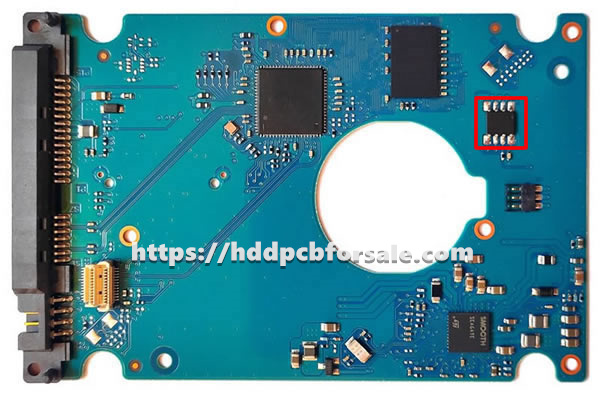
100771588 HDD PCB Seagate: firmware transfer

Tools used to transfer firmware: Screwdriver, Hot air rework station, Tweezers, etc.
Video guide: HDD PCB firmware transfer
Posted on

0A71284 HDD PCB Hitachi: firmware transfer

If the printed circuit board (PCB) of your hard drive is numbered 0A71284 is damaged, simply replacing a PCB with the same number may not repair your hard drive. You may also need to transfer the firmware from your old PCB to the new one.

What is the hard drive firmware?

The firmware of a hard disk drive (HDD) is a type of software built into the hardware of the drive itself. It consists of a set of instructions and codes that control various aspects of hard drive operation and functionality. Firmware plays a crucial role in managing data storage, performance and communication of the hard drive with the computer system.

It also contains the unique parameters of the hard drive, such as its model number, serial number, and capacity. This information is used by the computer to properly identify and access the hard drive. Without firmware transfer, the hard drive would not be able to communicate with the computer and the data on the hard drive would be inaccessible.

Where is hard drive firmware typically stored?

A hard drive’s firmware is typically stored on a special memory chip located on the hard drive’s printed circuit board (PCB). This memory chip, often called a firmware chip or ROM chip, contains the necessary software code and instructions that control the operation of the hard drive.

Hard drive firmware is usually stored in the BIOS chip or in the main controller chip. We can find this chip on the old PCB and transfer it to the new PCB to complete the hard drive firmware transfer.

  • BIOS Chip: The chip (8 pins, 4 pins on each side) with 25P05VP, 25P10VP, 25F512, 25F1024, 25F1024AN, SST25VF512, SST25VF010, etc. is the BIOS chip.
  • Main controller chip: For some PCBs, the firmware is stored on the main controller chip (the largest chip on the PCB). It is more complex to swap the chip. If so, please perform several tests on the hard drive PCBs that do not contain important data.

If you buy HDD PCB from our store, we will clearly mark the chip that needs to be replaced on the PCB before shipping. You can purchase and transfer firmware with confidence.

Tips: Most TV/phone repair shops can offer these transfer services for as little as $5-$20.

0A71284 HDD PCB Hitachi: firmware transfer

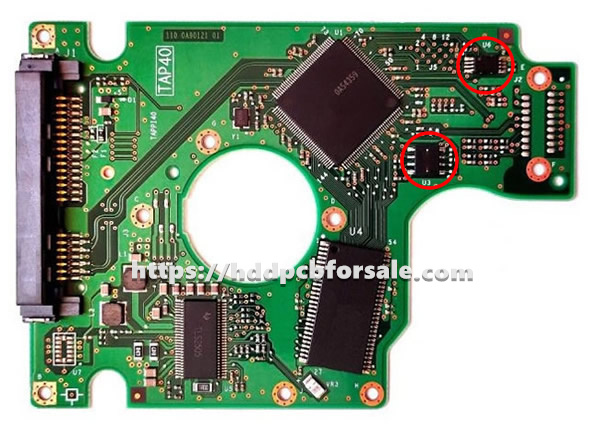
For 0A71284 HDD PCB Hitachi, you need to transfer the chip marked below:

0A71284 HDD PCB Hitachi: firmware transfer

Tools used to transfer firmware: Screwdriver, Hot air rework station, Tweezers, etc.
Video guide: HDD PCB firmware transfer

Posted on

100354297 HDD PCB Seagate: firmware transfer

If the printed circuit board (PCB) of your hard drive is numbered 100354297 is damaged, simply replacing a PCB with the same number may not repair your hard drive. You may also need to transfer the firmware from your old PCB to the new one.

What is the hard drive firmware?

The firmware of a hard disk drive (HDD) is a type of software built into the hardware of the drive itself. It consists of a set of instructions and codes that control various aspects of hard drive operation and functionality. Firmware plays a crucial role in managing data storage, performance and communication of the hard drive with the computer system.

It also contains the unique parameters of the hard drive, such as its model number, serial number, and capacity. This information is used by the computer to properly identify and access the hard drive. Without firmware transfer, the hard drive would not be able to communicate with the computer and the data on the hard drive would be inaccessible.

Where is hard drive firmware typically stored?

A hard drive’s firmware is typically stored on a special memory chip located on the hard drive’s printed circuit board (PCB). This memory chip, often called a firmware chip or ROM chip, contains the necessary software code and instructions that control the operation of the hard drive.

Hard drive firmware is usually stored in the BIOS chip or in the main controller chip. We can find this chip on the old PCB and transfer it to the new PCB to complete the hard drive firmware transfer.

  • BIOS Chip: The chip (8 pins, 4 pins on each side) with 25P05VP, 25P10VP, 25F512, 25F1024, 25F1024AN, SST25VF512, SST25VF010, etc. is the BIOS chip.
  • Main controller chip: For some PCBs, the firmware is stored on the main controller chip (the largest chip on the PCB). It is more complex to swap the chip. If so, please perform several tests on the hard drive PCBs that do not contain important data.

If you buy HDD PCB from our store, we will clearly mark the chip that needs to be replaced on the PCB before shipping. You can purchase and transfer firmware with confidence.

Tips: Most TV/phone repair shops can offer these transfer services for as little as $5-$20.

100354297 HDD PCB Seagate: firmware transfer

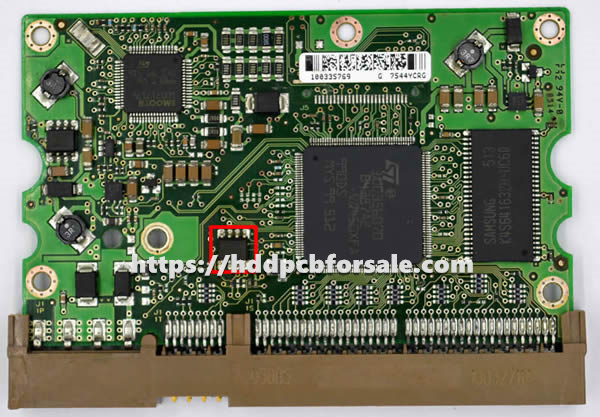
For 100354297 HDD PCB Seagate, you need to transfer the chip marked below:

100354297 HDD PCB Seagate: firmware transfer

Tools used to transfer firmware: Screwdriver, Hot air rework station, Tweezers, etc.
Video guide: HDD PCB firmware transfer
Posted on

2060-800032-004 HDD PCB WD: firmware transfer

If the printed circuit board (PCB) of your hard drive is numbered 2060-800032-004 is damaged, simply replacing a PCB with the same number may not repair your hard drive. You may also need to transfer the firmware from your old PCB to the new one.

What is the hard drive firmware?

The firmware of a hard disk drive (HDD) is a type of software built into the hardware of the drive itself. It consists of a set of instructions and codes that control various aspects of hard drive operation and functionality. Firmware plays a crucial role in managing data storage, performance and communication of the hard drive with the computer system.

It also contains the unique parameters of the hard drive, such as its model number, serial number, and capacity. This information is used by the computer to properly identify and access the hard drive. Without firmware transfer, the hard drive would not be able to communicate with the computer and the data on the hard drive would be inaccessible.

Where is hard drive firmware typically stored?

A hard drive’s firmware is typically stored on a special memory chip located on the hard drive’s printed circuit board (PCB). This memory chip, often called a firmware chip or ROM chip, contains the necessary software code and instructions that control the operation of the hard drive.

Hard drive firmware is usually stored in the BIOS chip or in the main controller chip. We can find this chip on the old PCB and transfer it to the new PCB to complete the hard drive firmware transfer.

  • BIOS Chip: The chip (8 pins, 4 pins on each side) with 25P05VP, 25P10VP, 25F512, 25F1024, 25F1024AN, SST25VF512, SST25VF010, etc. is the BIOS chip.
  • Main controller chip: For some PCBs, the firmware is stored on the main controller chip (the largest chip on the PCB). It is more complex to swap the chip. If so, please perform several tests on the hard drive PCBs that do not contain important data.

If you buy HDD PCB from our store, we will clearly mark the chip that needs to be replaced on the PCB before shipping. You can purchase and transfer firmware with confidence.

Tips: Most TV/phone repair shops can offer these transfer services for as little as $5-$20.

2060-800032-004 HDD PCB WD: firmware transfer

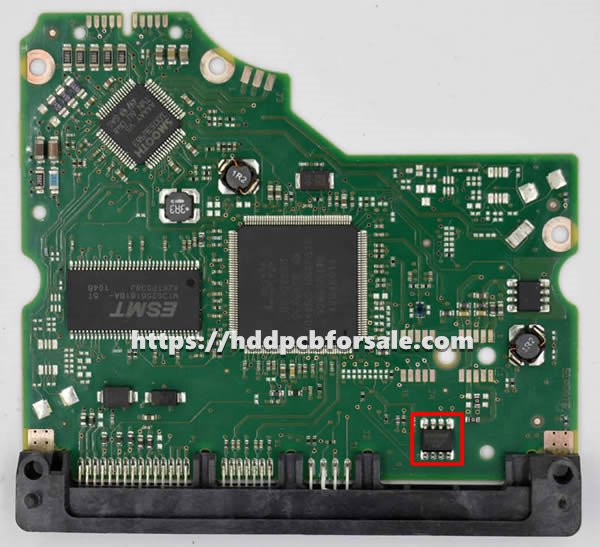
For 2060-800032-004 HDD PCB WD, you need to transfer the chip marked below:

2060-800032-004 HDD PCB WD: firmware transfer

Tools used to transfer firmware: Screwdriver, Hot air rework station, Tweezers, etc.
Video guide: HDD PCB firmware transfer
Posted on

100535537 HDD PCB Seagate: firmware transfer

If the printed circuit board (PCB) of your hard drive is numbered 100535537 is damaged, simply replacing a PCB with the same number may not repair your hard drive. You may also need to transfer the firmware from your old PCB to the new one.

What is the hard drive firmware?

The firmware of a hard disk drive (HDD) is a type of software built into the hardware of the drive itself. It consists of a set of instructions and codes that control various aspects of hard drive operation and functionality. Firmware plays a crucial role in managing data storage, performance and communication of the hard drive with the computer system.

It also contains the unique parameters of the hard drive, such as its model number, serial number, and capacity. This information is used by the computer to properly identify and access the hard drive. Without firmware transfer, the hard drive would not be able to communicate with the computer and the data on the hard drive would be inaccessible.

Where is hard drive firmware typically stored?

A hard drive’s firmware is typically stored on a special memory chip located on the hard drive’s printed circuit board (PCB). This memory chip, often called a firmware chip or ROM chip, contains the necessary software code and instructions that control the operation of the hard drive.

Hard drive firmware is usually stored in the BIOS chip or in the main controller chip. We can find this chip on the old PCB and transfer it to the new PCB to complete the hard drive firmware transfer.

  • BIOS Chip: The chip (8 pins, 4 pins on each side) with 25P05VP, 25P10VP, 25F512, 25F1024, 25F1024AN, SST25VF512, SST25VF010, etc. is the BIOS chip.
  • Main controller chip: For some PCBs, the firmware is stored on the main controller chip (the largest chip on the PCB). It is more complex to swap the chip. If so, please perform several tests on the hard drive PCBs that do not contain important data.

If you buy HDD PCB from our store, we will clearly mark the chip that needs to be replaced on the PCB before shipping. You can purchase and transfer firmware with confidence.

Tips: Most TV/phone repair shops can offer these transfer services for as little as $5-$20.

100535537 HDD PCB Seagate: firmware transfer

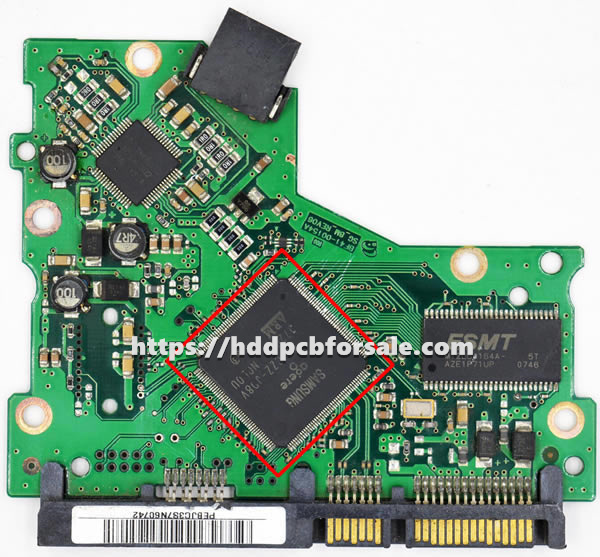
For 100535537 HDD PCB Seagate, you need to transfer the chip marked below:

100535537 HDD PCB Seagate: firmware transfer

Tools used to transfer firmware: Screwdriver, Hot air rework station, Tweezers, etc.
Video guide: HDD PCB firmware transfer
Posted on

BF41-00154A HDD PCB Samsung: firmware transfer

If the printed circuit board (PCB) of your hard drive is numbered BF41-00154A is damaged, simply replacing a PCB with the same number may not repair your hard drive. You may also need to transfer the firmware from your old PCB to the new one.

What is the hard drive firmware?

The firmware of a hard disk drive (HDD) is a type of software built into the hardware of the drive itself. It consists of a set of instructions and codes that control various aspects of hard drive operation and functionality. Firmware plays a crucial role in managing data storage, performance and communication of the hard drive with the computer system.

It also contains the unique parameters of the hard drive, such as its model number, serial number, and capacity. This information is used by the computer to properly identify and access the hard drive. Without firmware transfer, the hard drive would not be able to communicate with the computer and the data on the hard drive would be inaccessible.

Where is hard drive firmware typically stored?

A hard drive’s firmware is typically stored on a special memory chip located on the hard drive’s printed circuit board (PCB). This memory chip, often called a firmware chip or ROM chip, contains the necessary software code and instructions that control the operation of the hard drive.

Hard drive firmware is usually stored in the BIOS chip or in the main controller chip. We can find this chip on the old PCB and transfer it to the new PCB to complete the hard drive firmware transfer.

  • BIOS Chip: The chip (8 pins, 4 pins on each side) with 25P05VP, 25P10VP, 25F512, 25F1024, 25F1024AN, SST25VF512, SST25VF010, etc. is the BIOS chip.
  • Main controller chip: For some PCBs, the firmware is stored on the main controller chip (the largest chip on the PCB). It is more complex to swap the chip. If so, please perform several tests on the hard drive PCBs that do not contain important data.

If you buy HDD PCB from our store, we will clearly mark the chip that needs to be replaced on the PCB before shipping. You can purchase and transfer firmware with confidence.

Tips: Most TV/phone repair shops can offer these transfer services for as little as $5-$20.

BF41-00154A HDD PCB Samsung: firmware transfer

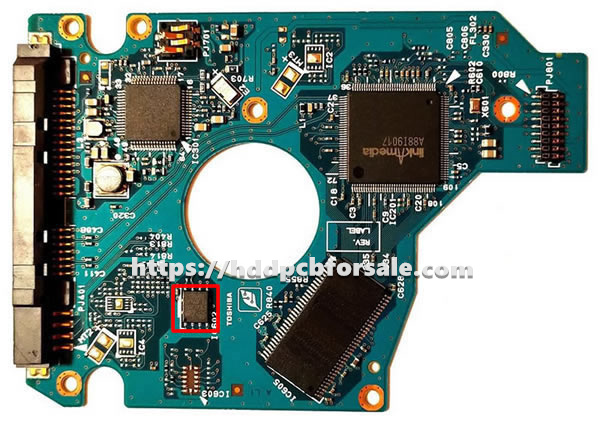
For BF41-00154A HDD PCB Samsung, you need to transfer the chip marked below:

BF41-00154A HDD PCB Samsung: firmware transfer

Tools used to transfer firmware: Screwdriver, Hot air rework station, Tweezers, etc.
Video guide: HDD PCB firmware transfer
Posted on

G002822A HDD PCB Toshiba: firmware transfer

If the printed circuit board (PCB) of your hard drive is numbered G002822A is damaged, simply replacing a PCB with the same number may not repair your hard drive. You may also need to transfer the firmware from your old PCB to the new one.

What is the hard drive firmware?

The firmware of a hard disk drive (HDD) is a type of software built into the hardware of the drive itself. It consists of a set of instructions and codes that control various aspects of hard drive operation and functionality. Firmware plays a crucial role in managing data storage, performance and communication of the hard drive with the computer system.

It also contains the unique parameters of the hard drive, such as its model number, serial number, and capacity. This information is used by the computer to properly identify and access the hard drive. Without firmware transfer, the hard drive would not be able to communicate with the computer and the data on the hard drive would be inaccessible.

Where is hard drive firmware typically stored?

A hard drive’s firmware is typically stored on a special memory chip located on the hard drive’s printed circuit board (PCB). This memory chip, often called a firmware chip or ROM chip, contains the necessary software code and instructions that control the operation of the hard drive.

Hard drive firmware is usually stored in the BIOS chip or in the main controller chip. We can find this chip on the old PCB and transfer it to the new PCB to complete the hard drive firmware transfer.

  • BIOS Chip: The chip (8 pins, 4 pins on each side) with 25P05VP, 25P10VP, 25F512, 25F1024, 25F1024AN, SST25VF512, SST25VF010, etc. is the BIOS chip.
  • Main controller chip: For some PCBs, the firmware is stored on the main controller chip (the largest chip on the PCB). It is more complex to swap the chip. If so, please perform several tests on the hard drive PCBs that do not contain important data.

If you buy HDD PCB from our store, we will clearly mark the chip that needs to be replaced on the PCB before shipping. You can purchase and transfer firmware with confidence.

Tips: Most TV/phone repair shops can offer these transfer services for as little as $5-$20.

G002822A HDD PCB Toshiba: firmware transfer

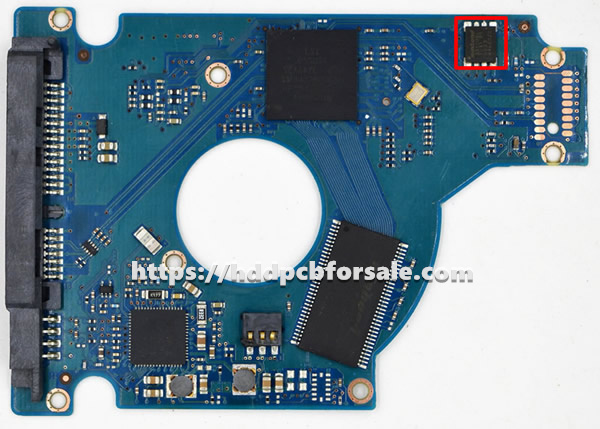
For G002822A HDD PCB Toshiba, you need to transfer the chip marked below:

G002822A HDD PCB Toshiba: firmware transfer

Tools used to transfer firmware: Screwdriver, Hot air rework station, Tweezers, etc.
Video guide: HDD PCB firmware transfer
Posted on

100591681 HDD PCB Seagate: firmware transfer

If the printed circuit board (PCB) of your hard drive is numbered 100591681 is damaged, simply replacing a PCB with the same number may not repair your hard drive. You may also need to transfer the firmware from your old PCB to the new one.

What is the hard drive firmware?

The firmware of a hard disk drive (HDD) is a type of software built into the hardware of the drive itself. It consists of a set of instructions and codes that control various aspects of hard drive operation and functionality. Firmware plays a crucial role in managing data storage, performance and communication of the hard drive with the computer system.

It also contains the unique parameters of the hard drive, such as its model number, serial number, and capacity. This information is used by the computer to properly identify and access the hard drive. Without firmware transfer, the hard drive would not be able to communicate with the computer and the data on the hard drive would be inaccessible.

Where is hard drive firmware typically stored?

A hard drive’s firmware is typically stored on a special memory chip located on the hard drive’s printed circuit board (PCB). This memory chip, often called a firmware chip or ROM chip, contains the necessary software code and instructions that control the operation of the hard drive.

Hard drive firmware is usually stored in the BIOS chip or in the main controller chip. We can find this chip on the old PCB and transfer it to the new PCB to complete the hard drive firmware transfer.

  • BIOS Chip: The chip (8 pins, 4 pins on each side) with 25P05VP, 25P10VP, 25F512, 25F1024, 25F1024AN, SST25VF512, SST25VF010, etc. is the BIOS chip.
  • Main controller chip: For some PCBs, the firmware is stored on the main controller chip (the largest chip on the PCB). It is more complex to swap the chip. If so, please perform several tests on the hard drive PCBs that do not contain important data.

If you buy HDD PCB from our store, we will clearly mark the chip that needs to be replaced on the PCB before shipping. You can purchase and transfer firmware with confidence.

Tips: Most TV/phone repair shops can offer these transfer services for as little as $5-$20.

100591681 HDD PCB Seagate: firmware transfer

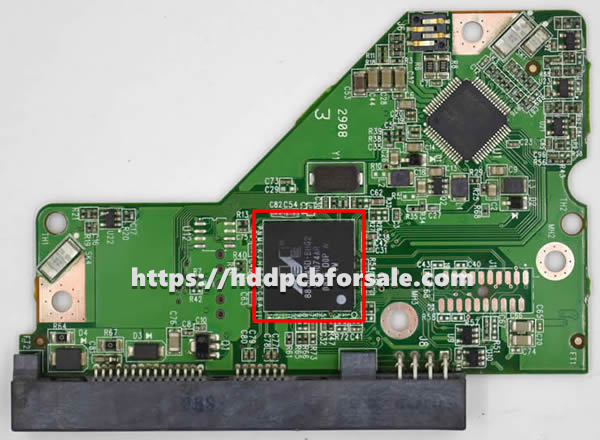
For 100591681 HDD PCB Seagate, you need to transfer the chip marked below:

100591681 HDD PCB Seagate: firmware transfer

Tools used to transfer firmware: Screwdriver, Hot air rework station, Tweezers, etc.
Video guide: HDD PCB firmware transfer
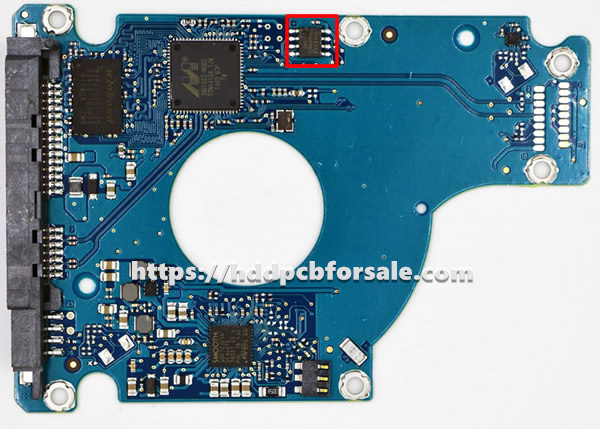
Posted on

2060-771577-000 HDD PCB WD: firmware transfer

If the printed circuit board (PCB) of your hard drive is numbered 2060-771577-000 is damaged, simply replacing a PCB with the same number may not repair your hard drive. You may also need to transfer the firmware from your old PCB to the new one.

What is the hard drive firmware?

The firmware of a hard disk drive (HDD) is a type of software built into the hardware of the drive itself. It consists of a set of instructions and codes that control various aspects of hard drive operation and functionality. Firmware plays a crucial role in managing data storage, performance and communication of the hard drive with the computer system.

It also contains the unique parameters of the hard drive, such as its model number, serial number, and capacity. This information is used by the computer to properly identify and access the hard drive. Without firmware transfer, the hard drive would not be able to communicate with the computer and the data on the hard drive would be inaccessible.

Where is hard drive firmware typically stored?

A hard drive’s firmware is typically stored on a special memory chip located on the hard drive’s printed circuit board (PCB). This memory chip, often called a firmware chip or ROM chip, contains the necessary software code and instructions that control the operation of the hard drive.

Hard drive firmware is usually stored in the BIOS chip or in the main controller chip. We can find this chip on the old PCB and transfer it to the new PCB to complete the hard drive firmware transfer.

  • BIOS Chip: The chip (8 pins, 4 pins on each side) with 25P05VP, 25P10VP, 25F512, 25F1024, 25F1024AN, SST25VF512, SST25VF010, etc. is the BIOS chip.
  • Main controller chip: For some PCBs, the firmware is stored on the main controller chip (the largest chip on the PCB). It is more complex to swap the chip. If so, please perform several tests on the hard drive PCBs that do not contain important data.

If you buy HDD PCB from our store, we will clearly mark the chip that needs to be replaced on the PCB before shipping. You can purchase and transfer firmware with confidence.

Tips: Most TV/phone repair shops can offer these transfer services for as little as $5-$20.

2060-771577-000 HDD PCB WD: firmware transfer

For 2060-771577-000 HDD PCB WD, you need to transfer the chip marked below:

2060-771577-000 HDD PCB WD: firmware transfer

Tools used to transfer firmware: Screwdriver, Hot air rework station, Tweezers, etc.
Video guide: HDD PCB firmware transfer

Posted on

100739392 HDD PCB Seagate: firmware transfer

If the printed circuit board (PCB) of your hard drive is numbered 100739392 is damaged, simply replacing a PCB with the same number may not repair your hard drive. You may also need to transfer the firmware from your old PCB to the new one.

What is the hard drive firmware?

The firmware of a hard disk drive (HDD) is a type of software built into the hardware of the drive itself. It consists of a set of instructions and codes that control various aspects of hard drive operation and functionality. Firmware plays a crucial role in managing data storage, performance and communication of the hard drive with the computer system.

It also contains the unique parameters of the hard drive, such as its model number, serial number, and capacity. This information is used by the computer to properly identify and access the hard drive. Without firmware transfer, the hard drive would not be able to communicate with the computer and the data on the hard drive would be inaccessible.

Where is hard drive firmware typically stored?

A hard drive’s firmware is typically stored on a special memory chip located on the hard drive’s printed circuit board (PCB). This memory chip, often called a firmware chip or ROM chip, contains the necessary software code and instructions that control the operation of the hard drive.

Hard drive firmware is usually stored in the BIOS chip or in the main controller chip. We can find this chip on the old PCB and transfer it to the new PCB to complete the hard drive firmware transfer.

  • BIOS Chip: The chip (8 pins, 4 pins on each side) with 25P05VP, 25P10VP, 25F512, 25F1024, 25F1024AN, SST25VF512, SST25VF010, etc. is the BIOS chip.
  • Main controller chip: For some PCBs, the firmware is stored on the main controller chip (the largest chip on the PCB). It is more complex to swap the chip. If so, please perform several tests on the hard drive PCBs that do not contain important data.

If you buy HDD PCB from our store, we will clearly mark the chip that needs to be replaced on the PCB before shipping. You can purchase and transfer firmware with confidence.

Tips: Most TV/phone repair shops can offer these transfer services for as little as $5-$20.

100739392 HDD PCB Seagate: firmware transfer

For 100739392 HDD PCB Seagate, you need to transfer the chip marked below:

100739392 HDD PCB Seagate: firmware transfer

Tools used to transfer firmware: Screwdriver, Hot air rework station, Tweezers, etc.
Video guide: HDD PCB firmware transfer